
AI & Software · Review
Google Antigravity Feels More Like a Staffing Agency Than an IDE
Agent-first building that feels less like an IDE and more like hiring a team.
 By Tony Simons Updated 4 min read
Disclosure: We may earn a commission when you shop through the links below. It never changes the verdict. Details

Disclosure
We may earn a commission when you shop through the links below. Opinions stay independent. Full disclosure
Google Antigravity isn’t trying to help you type faster.
It’s trying to help you finish work faster by handing tasks to multiple AI “agents” that plan, execute, and report back while you stay in control.
I’ve been using Antigravity on Windows to build several small-to-medium apps and automate the kind of tedious WordPress work that usually eats an afternoon. Nothing flashy. Just real, repetitive stuff.
So far? It’s been shockingly effective.
Google Antigravity: the short version
Agent-first building that feels less like an IDE and more like hiring a team.
My take
- Tested On
- Windows
- Mode
- Multi-Agent
- Use Case
- WordPress Automation
- Guardrail
- Approve Edits
- Alt Tool
- VS Code + Copilot
- Vibe
- “Staffing Agency”
Pros
- Planning → execution: For my workflows, it “just works” and actually finishes tasks.
- Multi-agent leverage: Delegate in parallel like you’re managing a tiny dev team.
- Approval-first control: Fast progress without surrendering your repo to chaos.
- Perfect for tedious work: WordPress automation and glue tasks stop being time vampires.
Cons
- Workflow shift: If you expect a traditional IDE, the “manager + agents” mindset takes adjustment.
- Use guardrails: Keep approvals on so every edit stays a learning opportunity.
Opinions are my own. We may earn a commission when you shop through the links below. How I test things →
What Antigravity Actually Is

Antigravity is Google’s agent-first development environment built around the idea that you don’t need one assistant. You need a team.
Instead of living in a single chat box, Antigravity is designed to run multiple agents at once and coordinate them like a project manager.
If you’ve been treating AI tools like “autocomplete with vibes,” this is a different mindset.
My Setup And How I Use It
- Platform: Windows
- Projects: Several new apps, plus WordPress automation and cleanup
- How I use it: Exclusively in multi-agent mode
- Safety setting: I require approval before any edits are applied
That last point matters.
I want Antigravity to move fast, but I also want to learn from it. The approval step gives me a chance to stop, ask why it picked a certain approach, or redirect the plan before it changes anything.
The Workflow: Delegate, Supervise, Ship
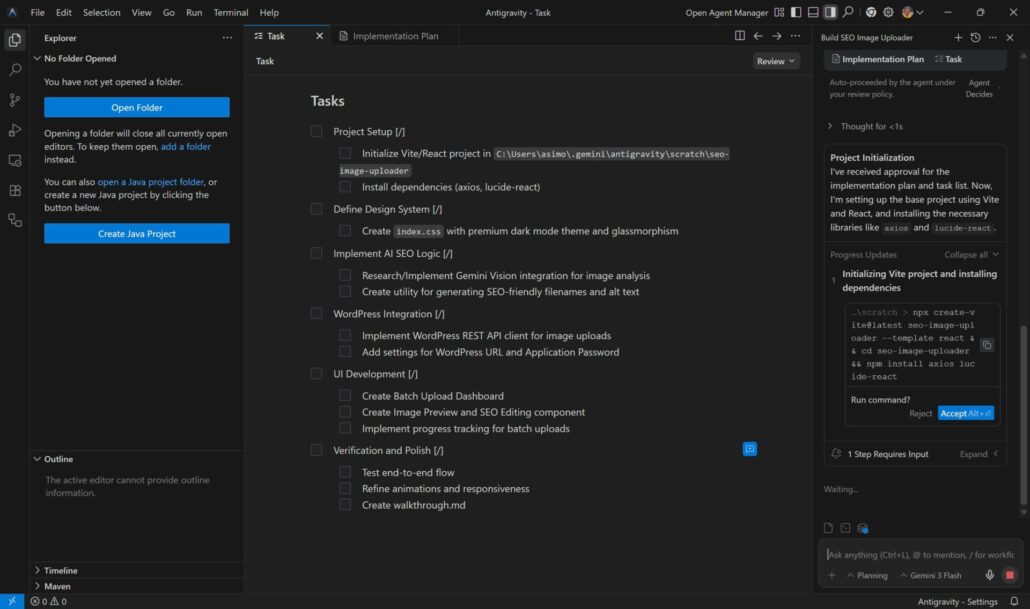
This is where Antigravity clicks.
You can hand an agent a task like “automate this WordPress workflow” or “build a small utility that does X,” and it’ll typically:
- Break the work into steps
- Execute the steps
- Ask for approvals where needed
- Iterate until the job is done
For my needs, the plan-to-execution loop has largely “just worked.”
That’s the magic: less babysitting, more progress.
What Antigravity Does Best
- Planning that turns into real output – A lot of AI tools can write code. Fewer can consistently turn a plan into a working result without drifting, forgetting context, or getting stuck in a loop. Antigravity has been strong at taking a fuzzy goal and turning it into a sequence that actually completes.
- Multi-agent work feels like leverage – I’m not using Antigravity like an IDE. I’m using it like a staffing agency: “you take this,” “you handle that,” and I’ll review what comes back. That’s a different level of leverage than a single assistant sitting in your sidebar.
- Approval-first keeps you in control – My favorite feature isn’t flashy. It’s the ability to keep Antigravity moving while still requiring me to sign off on edits.
- That turns it from “autonomous chaos” into “fast collaboration.”
What Has Broken My Trust
So far, nothing.
No scary moments. No mystery changes. No “why did it do that?” disasters.
That said, Antigravity is an early preview product, and any tool that can run commands or modify files deserves respect.
If you’re going to use it, treat it like you’d treat a new intern with root access: capable, helpful, and still not infallible.
Antigravity vs. VS Code + Copilot
My normal setup is VS Code with Copilot available, but I rarely use Copilot’s deeper features.
Antigravity feels like it’s from a different era.
Copilot is great at helping you write the next line.
Antigravity is about completing the next task.
If your day is full of “ugh, I just need to wire this up / automate this / refactor that,” Antigravity is the first tool I’ve used that consistently takes meaningful chunks off the board.
Who Should Use It
If you’re interested in coding — beginner to veteran — Antigravity is worth learning.
Beginners will get a guided planning partner.
Experienced developers will get a way to offload the tedious stuff while staying focused on the decisions that actually matter.
Tips To Use Antigravity Safely (Especially On Windows)
This is how I’d recommend approaching it so you keep the speed without inviting disaster:
- Keep approvals on until you’re 100% sure you trust the workflow.
- Use a dedicated project folder (not your whole drive).
- Commit early and often so you can roll back changes.
- Back up anything that matters before letting any agent touch it.
- Start with low-stakes tasks (automation, cleanup, scaffolding) before big migrations.
Final thoughts
Right now, Google Antigravity feels less like an IDE and more like a new category: agent-powered production.
For WordPress automation and small app work, it’s been “hand it a task and watch it finish”, which is exactly what I want from tools in 2026.
If Google keeps improving the guardrails and reliability, Antigravity could become the default way a lot of people build software.
Reviewed & written by
Tony Simons
Tony has a bachelor's degree from the University of Phoenix and over 14 years of writing experience between multiple publications in the tech, photography, lifestyle, and deal industries.


